MIX 2.0 · TRADINGVIEW SIGNAL SYSTEM
Three signal types.
A clearer plan.
MIX 2.0 uses trend, reversal and confluence signals to support an independent trader's chart review. Direction comes first: a trade is worth taking only when probability and payoff line up — win rate, risk per trade, and room to target. The trade plan remains your decision.
- 3signal types
- 60recent charts
- Any TFTradingView
- 0repainting
by timeframe and market
SIGNAL ARCHITECTURE
Trend first. Then location. Then check for confluence.
Each type has its own role. Signals use closed candles for confirmation.
Follow an established move
Appears when a trend is established or developing. Typical cases include a pullback confirmation or continuation after a breakout.
Read trend signal notes →Watch a turn at key levels
Appears near range extremes for a potential reversal. Price structure, stop placement and risk still need their own review.
Read reversal signal notes →Both engines point the same way
Both engines agree on the same candle. This is the confluence signal, the least frequent of the three.
Inspect the chart examples →REFERENCE LAYERS
Direction first. Then probability and payoff.
MIX is about direction, not a specific entry price — nobody knows how the next candle will move.
A signal answers which way to look first: trend continuation, or a turn at a key level. If the direction is wrong, nothing else matters.
Win rate only means something together with payoff. A 40% win rate with 3R can stay positive, while an 80% win rate with 0.5R can be undone by one normal loss. Asking only “how accurate” is the wrong question.
NON-REPAINTING
Closed candles. No future data.
MIX calculations use completed candles. Once a candle closes, the confirmed signal stays fixed. An open candle can still move with live price, which is normal TradingView behaviour.
fixed on close
EVIDENCE / RECENT CHARTS
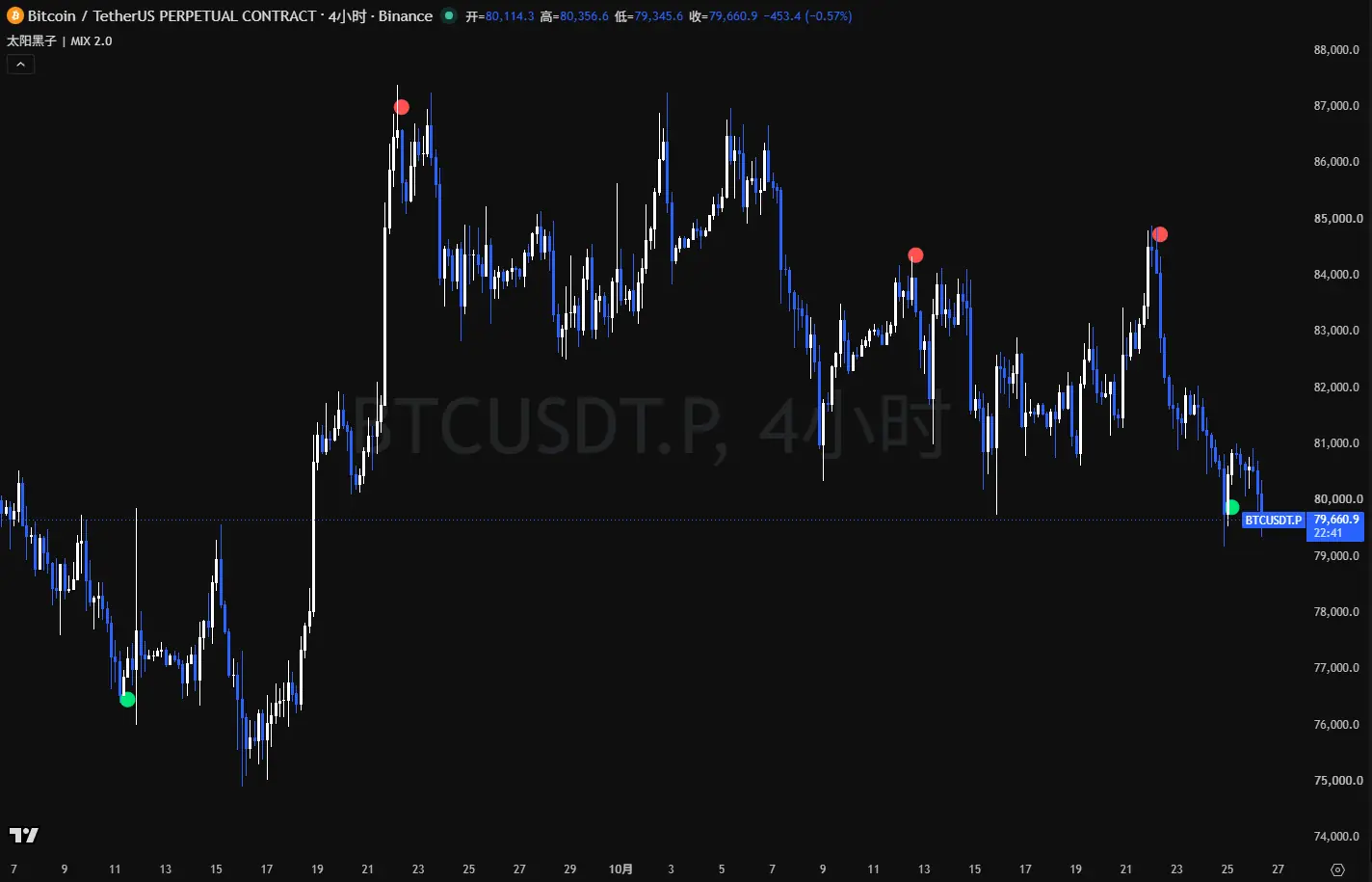
See the signals in market context.
The full gallery contains 46 recent TradingView screenshots. Each label shows the market and timeframe visible in the chart.
Open all 60 chart examples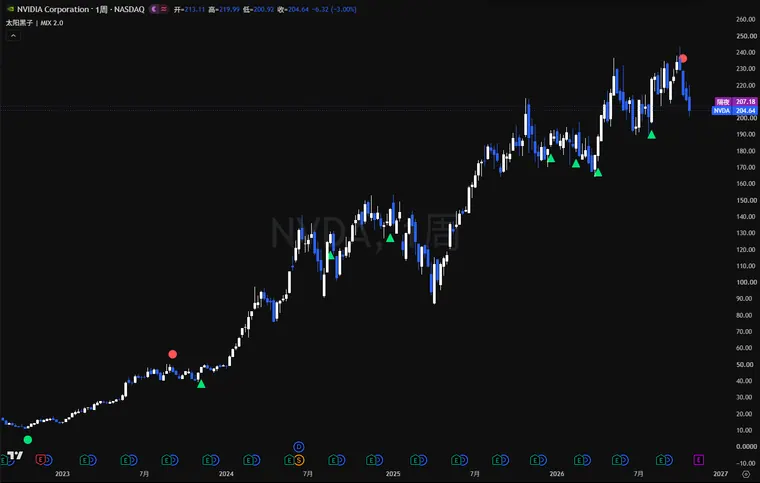
PUBLIC CHANNEL
See the channel first, then decide.
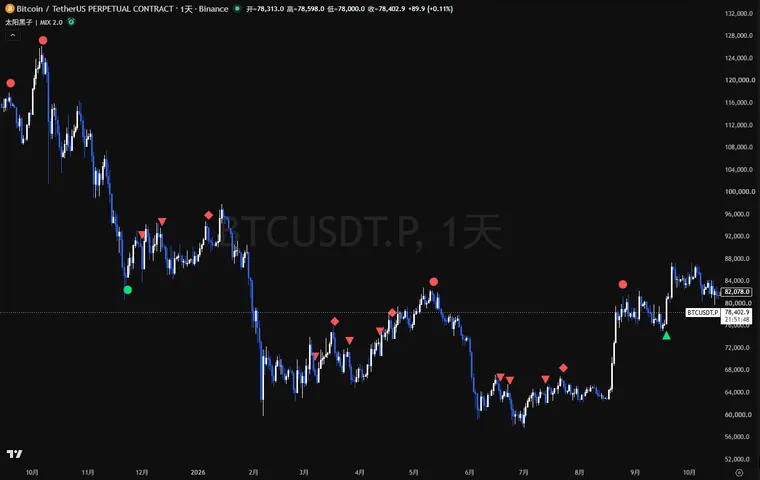
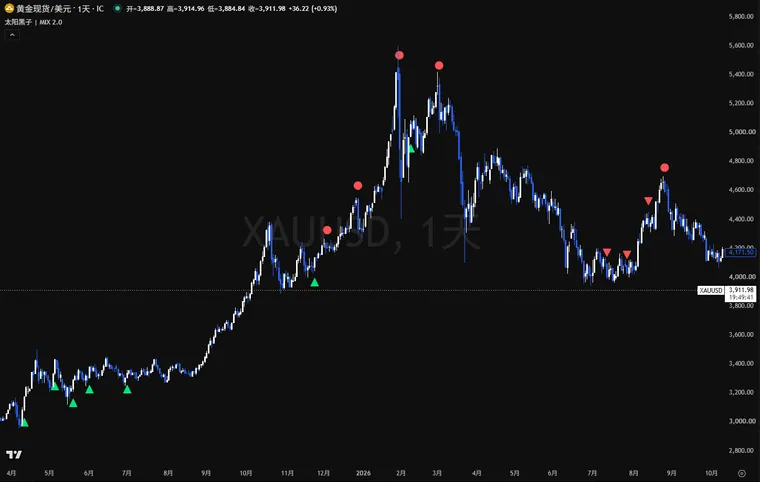
These are real examples from 2026-10-16 to 2026-10-25, not a performance promise.
Bitcoin 4H signal example
2026-10-24, BTC 4-hour signals. Open the original post for the chart and text.
Open original post →Gold · 4HGold 4H signal example
2026-10-16, gold 4-hour signal. Open the original post for the chart and text.
Open original post →Join freePublic channel
Free MIX signals on Telegram across assets. Watch the style first, then decide on a licence.
Join the channel →FREE TOOLS
Use the free tools first.
The public channel, the open-source trend cloud, the MT5 tools and the position-sizing calculator are all free. No payment is needed to start.
Position-sizing calculator
Set the planned loss, then calculate executable size against MT5 symbol specifications.
Open calculator →Open sourceTrend Cloud indicator
A fully open-source EMA trend indicator. Read the code, add it to your chart, no licence request needed.
View Trend Cloud →Completely freeMT5 risk tools
Helpers for position size, stop placement and open-position management in MetaTrader 5.
View the tools →FreePublic channel
Free 4H signals on Telegram across assets. Watch the style before deciding on a licence.
Join the channel →ACCESS
Public channel or indicator licence?
Start with the free channel to review the signals, or contact directly about the full TradingView indicator licence.
Public channel
Public 4H signals on Telegram across multiple markets.
- No payment
- Review the signal style
- Examples linked on this page
MIX Indicator
Use the full indicator in TradingView.
- MIX TradingView licence
- Any supported market and timeframe
- Trend, reversal and confluence signals
- Supports TradingView alerts
Getting access
- 1
Contact on Telegram and review the public examples first.
- 2
Confirm the MIX licence and its 300 USDT / month price.
- 3
After access is set up, find MIX in your TradingView indicator list.
FAQ
Common questions
Does a signal tell me where to enter and where the stop goes?
A signal's job is direction, not a specific entry price. Your trade plan remains your decision.
Does MIX repaint or use future data?
MIX calculations use completed candles. A confirmed signal is fixed after the candle closes. An open candle can still change with live price.
Public channel or licence?
The public channel is free and posts 4H signals. The licence provides the full TradingView indicator, covering supported markets and timeframes, with TradingView alerts.
Where is the full documentation?
The full documentation is currently written in Simplified Chinese. The calculator and public channel are available through the links on this page.